Flow POS System

Complete Restaurant Management Solution

Flow POS is a powerful, enterprise-grade Point of Sale and restaurant management system tailored for the Pakistani, US, UK, UAE, Market. Built on years of industry expertise, it unifies all core restaurant operations into a single, intuitive platform.

From order management and payments to inventory control and financial reporting, everything works seamlessly together. The system features a modern, touch-optimized interface designed for speed and efficiency during peak hours.

Flow POS offers a complete suite of modules including POS operations, vendor management, expenses, and warehouse control. It integrates effortlessly with local payment solutions such as Easypaisa and JazzCash or Zelle,Cash app, payoneer.

Designed to support both single outlets and multi-location businesses, Flow POS scales as your business grows. With real-time data, advanced security, and actionable analytics, Flow POS enables smarter decisions and better customer experiences.

Key Capabilities

  • Mobile Dashboard & Cloud Backup
  • KOT & Kitchen Display System (KDS)
  • Receipt & Invoice Customization
  • Employee Management
  • Mobile Reporting System (FMR)

Business Benefits

  • Inventory Management
  • Vendor & Purchase Management
  • Reports & Analytics
  • Shift & Cash Management
  • Offline & Online reporting system

Secure Login System

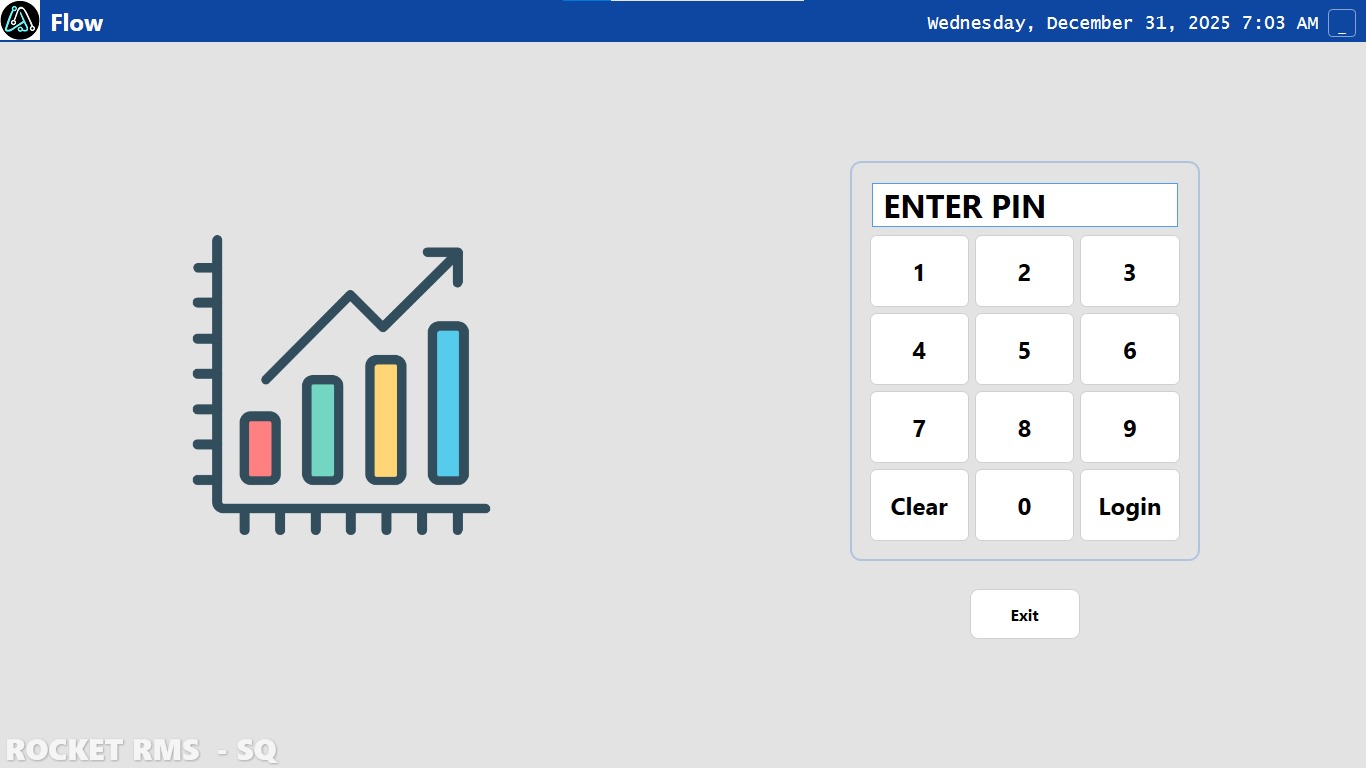
The Flow POS system begins with a robust, secure authentication interface designed for quick and safe access. The login screen features a clean, professional design with a prominent PIN entry keypad, allowing authorized staff to access the system quickly without compromising security.

The interface displays real-time date and time information, ensuring users are always aware of the current operational context. The system's security-first approach means that each user must authenticate with their unique PIN before accessing any functionality, protecting sensitive business data and transaction information.

Secure PIN-based authentication system with real-time date and time display. Quick access for authorized staff while protecting sensitive business data.

  • PIN-based secure authentication
  • Real-time date and time display
  • Intuitive numeric keypad interface
  • Quick access with exit option
Flow POS Login Screen
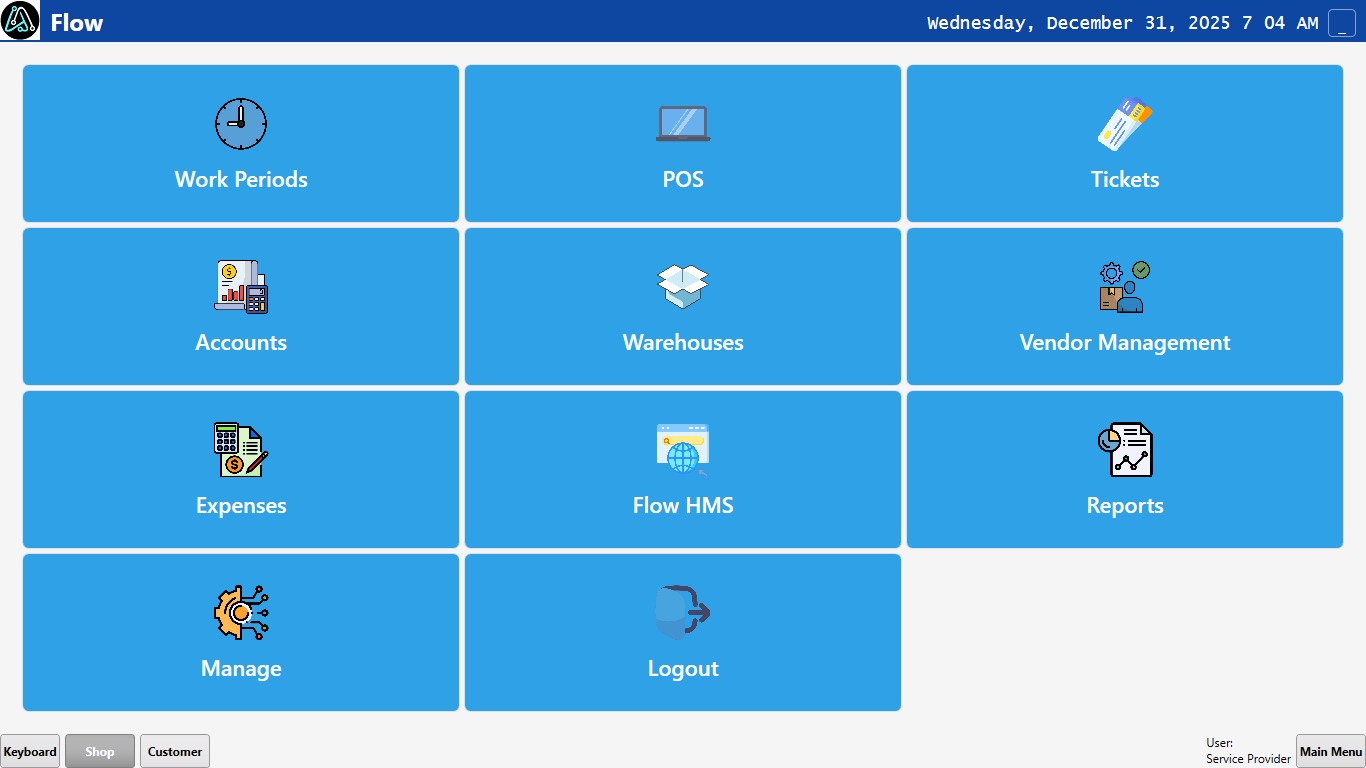
Flow POS Main Menu Dashboard

Comprehensive Dashboard

The main menu serves as the central command center for all Flow POS operations. This intuitive dashboard presents all system modules in an organized, grid-based layout, making it easy for users to navigate to any function they need. Each module is represented by a large, clearly labeled button with an icon, optimized for touch-screen interaction.

From this dashboard, users can access Work Periods management, Point of Sale operations, Ticket management, comprehensive Accounts functionality, Warehouse management, Vendor Management, Expense tracking, Flow HMS integration, detailed Reports, and system Management settings. The interface also provides quick navigation tabs for Keyboard, Shop, and Customer functions, along with user information display.

Central command center with organized grid-based layout. Access all system modules including POS, Accounts, Warehouse, Vendor Management, and Reports with touch-optimized interface.

  • Centralized module access
  • Touch-optimized interface design
  • Quick navigation tabs
  • User role and status display

Complete Order Management

The Order Bill screen provides a comprehensive view of the current transaction, displaying all items with their quantities and individual prices. The interface clearly shows the order status (New Orders) and provides a detailed itemized list, making it easy for both staff and customers to review the order before payment.

The system calculates and displays the total balance prominently, and offers three primary action buttons: Settle for processing payment, Close for finalizing the order, and Back for returning to order modification. This screen serves as the critical checkpoint before payment processing, ensuring accuracy and transparency in every transaction.

Comprehensive transaction view with itemized list showing quantities and prices. Real-time balance calculation with clear action buttons for payment processing.

  • Itemized order display with pricing
  • Real-time balance calculation
  • Order status tracking
  • Clear action buttons for workflow
Flow POS Order Bill Interface
Flow POS Payment Processing Screen

Advanced Payment Processing

The Print Bill screen represents the sophisticated payment processing module of Flow POS, offering unparalleled flexibility in handling transactions. The interface displays the total amount and charged amount, with a comprehensive set of tools for payment processing including quick-pay buttons for common denominations (1, 5, 10, 20, 50, 100), split payment options (1/2, 1/3, 1/n), and advanced features like discount percentages, rounding, and service charges.

The system supports multiple payment methods including Cash, Credit Card, Easypaisa, JazzCash, Online payments, and Credit accounts, making it perfect for the Pakistani market. The interface includes a full numeric keypad for precise amount entry and provides options for ticket management and bill printing, ensuring a complete transaction workflow from start to finish.

Sophisticated payment processing with multiple methods (Cash, Card, Easypaisa, JazzCash). Quick-pay buttons, split payments, discounts, and service charges for complete transaction flexibility.

  • Multiple payment method support
  • Split payment functionality
  • Quick-pay denomination buttons
  • Discount and service charge options

Comprehensive Vendor Management

The Vendor Management module provides a complete solution for managing supplier relationships and vendor accounts. The interface features a powerful search functionality that allows users to quickly locate vendors by name, code, contact person, or phone number. The search results are displayed in a structured table format showing key information including vendor name, code, contact details, current balance, and status.

The detailed vendor information panel displays comprehensive vendor data including contact person, email, address, and account balance. The system enables users to perform various actions such as viewing account details, adding transactions, editing vendor information, and managing vendor records. This module is essential for maintaining accurate supplier relationships and tracking vendor accounts payable.

Complete vendor management solution with powerful search by name, code, or contact. Track vendor accounts, manage transactions, and maintain supplier relationships efficiently.

  • Advanced vendor search functionality
  • Comprehensive vendor information display
  • Transaction management capabilities
  • Vendor account balance tracking
Flow POS Vendor Management Interface
Flow POS Expense Management Interface

Expense Tracking & Management

The Shop Details screen provides a comprehensive expense management system that allows restaurant owners to track, categorize, and analyze all business expenditures. The interface features advanced filtering capabilities, enabling users to filter expenses by date range, category, status, and payment method, making it easy to analyze spending patterns and maintain accurate financial records.

The expense table displays detailed information including date, category, description, total amount, status, and payment method for each transaction. Users can create new expenses, manage categories, refresh data, and save changes. The system includes pagination controls for handling large datasets efficiently, ensuring smooth performance even with extensive expense records.

Comprehensive expense management with advanced filtering by date, category, and payment method. Track and analyze all business expenditures with detailed transaction records.

  • Advanced filtering and search options
  • Category-based expense organization
  • Payment method tracking
  • Efficient pagination for large datasets

Comprehensive Reporting & Analytics

The Work Period Report demonstrates Flow POS's powerful reporting capabilities, providing restaurant owners with detailed insights into their business performance. The report displays comprehensive sales data including total sales, income breakdown by payment method (showing percentages and amounts for Easypaisa, Cash, and other methods), order counts, ticket statistics, and user-specific sales performance.

The reporting module includes a navigation panel with access to various report types including Item Sales Report, Accounts Liability, Accounts Receivable, Inventory Reports, Cost Reports, Expense Reports, and Vendor Balance Reports. Users can select specific date ranges, refresh data, print reports, and save reports for future reference. This analytical capability empowers business owners to make data-driven decisions and identify trends in their operations.

Powerful reporting with detailed sales analytics, payment method breakdowns, and order statistics. Access multiple report types including sales, inventory, and expense reports for data-driven decisions.

  • Detailed sales and income analytics
  • Payment method breakdown with percentages
  • Order and ticket statistics
  • Multiple report types available
Flow POS Work Period Report
Live Demo